
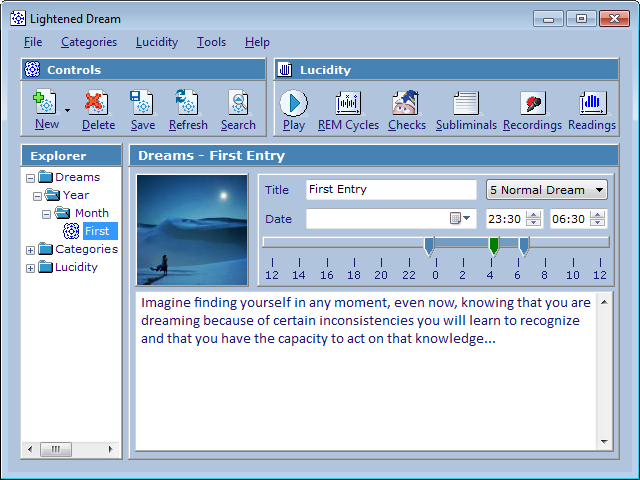
A free and open source dream journal designed for dreamers in search for lucidity.
lucidcode
INSPEC lucid dreaming device Lucid Scribe App lucid dreaming tools Lightened Dream journal for lucid dreamers Halographs REM detection devices Lucid Scribe biofeedback software Lucid Scribe Database open dream research Discord Server research & dev updatesCategories
- Hacking (13)
- Security (3)
- Hardware (25)
- Halograph EEG (1)
- Halograph EOG (7)
- Halograph FM (1)
- Halovision INSPEC (18)
- Research (14)
- Software (300)
- Lightened Dream (28)
- Lucid Scribe (71)
- Lucid Scribe Android (9)
- FILD (4)
- Halovision (2)
- ThinkGear EEG (3)
- Lucid Scribe App (22)
- Lucid Scribe Plugins (185)
- BrainFlow (2)
- Emotiv EPOC (1)
- Halovision (63)
- Hypnodyne ZMax (1)
- InteraXon Muse EEG (6)
- Keyboard (3)
- LightStone IOM (11)
- lucidcode Halograph FM (6)
- Mattel Mindflex (5)
- Microphone (2)
- Milliseconds (3)
- Mouse FIELD (11)
- Muse (2)
- NeuroSky ThinkGear EEG (29)
- OCZ NIA (2)
- OpenBCI (2)
- OpenEEG (14)
- Ping (1)
- Pranayama (6)
- tACS (8)
- TCMP (7)
- tDCS (8)
- TI EZ430 Chronos (3)
- Zeo EEG (13)
- Lucid Scribe Plugouts (7)
- Arduino (1)
- Screen LED (1)
- Yocto PowerRelay (5)
- Hacking (13)
 lucidcode
Sometimes, when I go to edit dream signs and save it a box pops up with the dialogue: LightenedDream.edit() “Could not find part of the path,” and I cannot save my edit to that dream sign. But it’s not on all dream signs. Sometimes when I close and open it the problem goes away for a bit.
Also, when I first installed, whenever I closed the program it would spit out an error at me telling me that I didn’t have a compatible windows component and pointed me to a hotfix on the windows website. I don’t remember the specific error because I clicked the “This program worked correctly” option and the prompt went away. I have Windows 7 64bit, if that matters.
I added some extra error handling to the dream signs in the latest version. Let me know if you still get that error message and what the stack trace is!
This should fix that error message for Windws 7 64bit: 395040_intl_x64_zip.exe.
I cannot run the program. Window appears with a message:
LightenedDream.Migrate()
Cannot crate a file when that file already exists.
It sounds like something went wrong with the migration from Liquid Dream. Make a backup or copy of \Documents\lucidcode\ (if you have any dreams stored in the program), delete it and then try again.
Thanks!
Actually, I reinstalled LD, and problem was lucidcode folder in My Documents (which remain after uninstalling).
hi there, great application 🙂
I’m getting one error though when trying to play Lucidity Checks:
System.Windows.Forms.AxHost+InvalidActiveXSteateException
anything I can do about that? thank you!
Thanks. Try this:
If your machine is 32-bit: 395039_intl_i386_zip.exe.
If your machine is 64-bit: 395040_intl_x64_zip.exe.
hi, thanks for the reply, works like a charm now 🙂
greetings from Austria.
Lightened Dream.Splash.LoadGraph()
Class not registered (exception from HRESULT: 0x80040154
(REGDB_E_CLASSNOTREG))
what does this mean??
It requires Windows Media Player. You can download it for free from Microsoft: http://windows.microsoft.com/en-us/windows/download-windows-media-player.
Hey thanks, it worked. I only had to activate Windows Media Player under “Programs and Functions.”
Why does this program require Windows Media Player exactly? I just can’t figure out why a program with a focus around writing would have WMP as a mandatory requirement.
I got a little creative and added some features to play audio tracks every 90 minutes, or whatever time span is configured… a shot in the dark to get them to play in a dream.
I always have my Lightened Dream on, 6 yrs so far
Love this application and reminds me of my goals and affirmations…..
Thanks for the marvel of it!
Is there A way to get it for mac??
Yes! Thanks to your message I had another look into it and managed to get something going> https://lucidcode.com/2017/09/26/lightened-dream-for-mac/
Let me know if it works for you!